

ZAVANTA 6.1
A smarter, simpler experience for contributors
Zavanta 6.1 introduces a streamlined contributor experience designed to make navigation easier, document management faster, and workflows more intuitive, without changing the features your teams already rely on.
Say hello to a refreshed version of the Zavanta platform. In this video, we’ll walk you through what’s new in the 6.1 release.
A new navigation experience
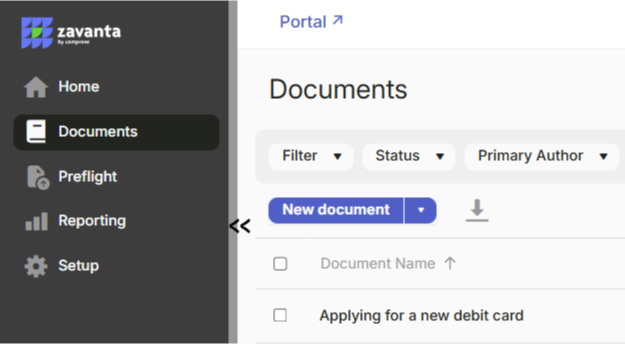
Zavanta 6.1 replaces the traditional mega menu with a collapsible Main Menu featuring site map style navigation across the application.
Favorites are customizable by each user and appear beneath the Main Menu icons when the sidebar is expanded. This allows contributors to keep the tools they use most close at hand, including Inbox access and new document creation.
The result is faster navigation and a cleaner interface built around how contributors actually work.
Optimize your workspace by expanding or collapsing the Main Menu
Quickly access company branding, Portal, Inbox, Help, and User utilities from the top bar
Keep frequently used features within reach by favoriting up to 10 items
Customize your experience by reordering favorites with drag-and-drop functionality
Global application search
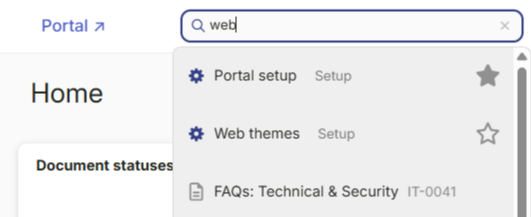
Zavanta 6.1 introduces a new application-wide search bar that is available across the contributor experience.
This unified search makes it easier to move between features without navigating through menus. Features you frequently use can also be marked as favorites to keep them accessible in the sidebar.
Get to the right content faster by instantly finding documents
Pick up work quickly by opening existing documents from the navigation bar
Create content faster by launching new documents in one place
Move through Zavanta easily by jumping straight to features
Redesigned home page
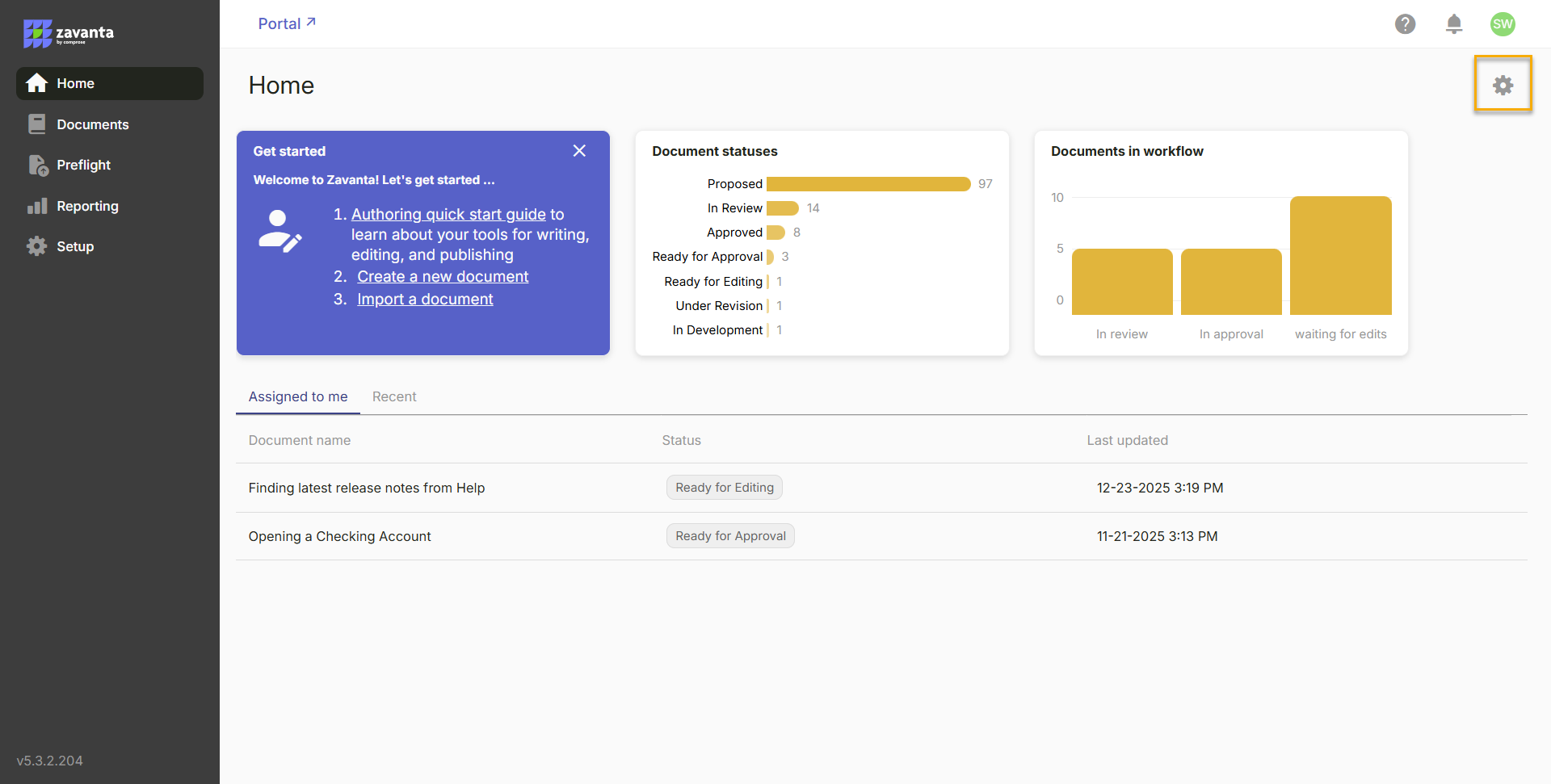
The new Home page replaces the contributor dashboard with a simplified, configurable layout.
Preflight documents that were recently accessed display a Preflight badge instead of a document number, helping contributors quickly identify content created through Preflight.
This design gives contributors immediate visibility into what needs attention.
See what matters faster with smaller, configurable widgets at the top of the homepage
Stay on top of your work with a dedicated Assigned Documents tab
Jump back in quickly with a Recent Documents view of your latest content
Personalize your workspace by choosing which widgets appear
Unified Document Comparison (beta)
Review changes more clearly with a unified comparison view for document changes. This new comparison experience is available when reviewing:
- Workflow document revisions
- Audit trail changes
- Version comparisons
Administrators can choose between the traditional side by side comparison view and the new unified comparison view through Application Preferences.
Smarter document management
Manage large document libraries faster and more intuitively with a flexible, customizable document list experience. You can now:
- Use quick dropdown filters based on reserved fields
- Apply cumulative filters to narrow results step by step
- Use traditional advanced filters for precise criteria
- Customize visible columns using the column selector
- Export the list of documents currently displayed
- Select multiple documents and apply bulk actions
Individual document actions are available through the More menu beside each document. This Actions menu consolidates document history, markup history, comment history, and version comparison into a single location. Managing large document libraries is now faster and more intuitive.
Improved Preflight experience
Prepare and manage documents more efficiently with a consistent, streamlined Preflight experience. Preflight now uses the same document list interface as the main Documents page. This includes:
- Quick filters
- Custom filters
- Column selection
- Bulk document actions
- A consolidated More menu for document actions
These updates provide a consistent experience when working with documents before they enter Zavanta workflows.
Centralized reporting and setup
Manage your Zavanta environment more effectively with centralized reporting and a streamlined setup experience. Managers now have:
- A dedicated Reporting page for monitoring system activity
- A unified Setup page that contains all configuration tools
The features available in Setup depend on the user's permissions. Everything needed to manage your Zavanta environment is now organized in a clearer structure.
More informative inbox
Stay informed and take action faster with a clearer, more informative Inbox experience. The new Inbox opens as a full page experience and includes three tabs:
- Messages
- Jobs
- Notifications
The Inbox icon provides visual indicators to show what requires attention.
- A yellow envelope indicates unread messages
- A red badge indicates system notifications from Comprose, such as release notes or office notices
- The Jobs tab displays background processes currently running in the system
Notifications automatically expire after a set period even if no action is taken.
Quality improvements
Zavanta 6.1 also includes stability improvements and bug fixes, including:
- Ability to update minor revision history in Workflow Designer
- Resolution of an access denied error when using Save As
- Fix for a Forms list field layering issue
These updates help ensure a more stable and reliable experience across the Zavanta platform.
Refreshed Help Center
Get answers faster and support your team more effectively with a refreshed Help Center experience.
The refreshed Help Center makes it easier to find guidance, explore resources, and stay informed. With clearer organization and improved access to documentation, users can quickly locate the information they need without leaving their workflow.
Whether you’re troubleshooting, learning a feature, or onboarding new team members, the updated experience ensures help is always easy to access and simple to navigate.
Additional enhancements
View PDF attachments in the portal
PDF attachments linked to documents in the Portal can now be opened directly in a browser tab without first downloading the file. Users can choose to view, print, or download the attachment from the viewer.
Global Translation System improvements
Documents can now begin in any supported language. Content created or imported through Preflight can be written in a non English language and then translated through Zavanta language workflows. While the application interface remains in English, the content itself can be authored, translated, and generated by AI in the specified language.
Interface preferences
Application Preferences now include a new tab that allows administrators to control contributor interface settings, including the ability to select the Zavanta 6 experience and choose the preferred document comparison view.
Ready to Put Zavanta 6.1 to Work?
With a more intuitive interface and smarter ways to navigate, search, and manage content, Zavanta 6.1 is designed to help your team work more efficiently. As you explore these updates, your Customer Success Manager is here to support you. Reach out anytime with questions or for help getting the most out of the new experience.